Open-source SOUNDPEATS app (a PeatsAudio alternative)
PairFree is a free, open-source Android and Windows app for SOUNDPEATS earbuds. It does what PeatsAudio, the official app, does, without an account or internet access.
PairFree does not need PeatsAudio (the SOUNDPEATS app) to run, but only one app can hold the control connection to the earbuds at a time, so close PeatsAudio (the SOUNDPEATS app) first.
What you can control
Each model shows only the settings it has:
- Battery for each earbud and the case.
- Noise control: off, noise cancelling and transparency, with their scenes and levels where the model has them.
- The equalizer: the model’s own presets and your own saved curves, and a hearing test that builds a curve for you.
- Game mode, LDAC and LE Audio, two devices at once, the ear tip fit test, find my earbuds and water drain.
- Touch controls and the settings only some models have, such as spatial audio, Dolby and dynamic bass.
On Windows too
Almost none of these brands makes a Windows app, so on a PC their earbuds are plain Bluetooth audio. PairFree for Windows is one small portable program (no installer) with the same settings as the Android app, in a window made for a mouse and with a tray icon for the battery and quick switches. It needs Windows 10 (version 1809) or 11, 64-bit, with the earbuds paired in Windows’ Bluetooth settings. SOUNDPEATS is covered.
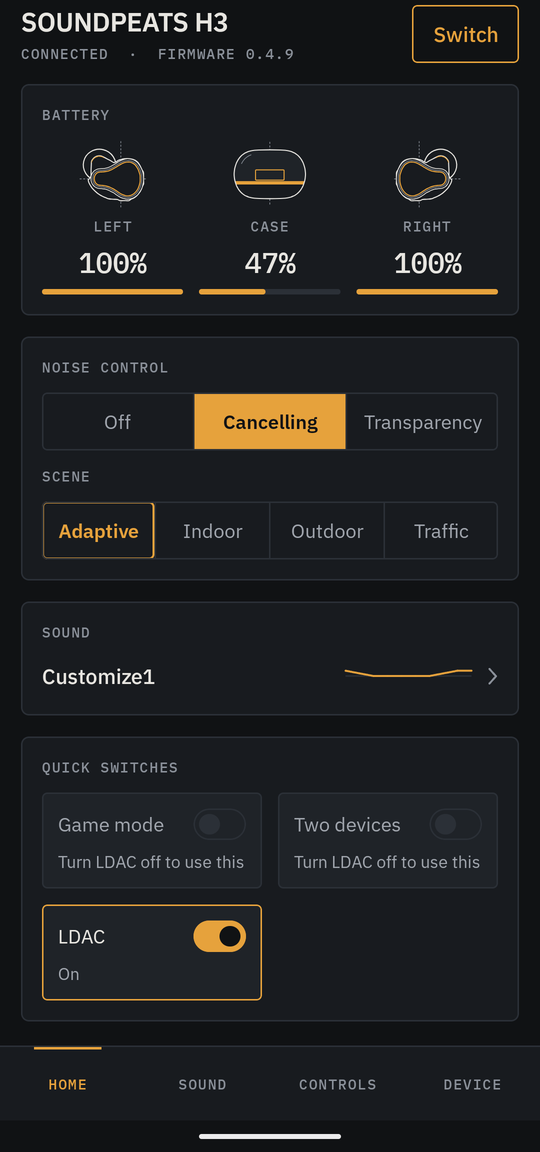
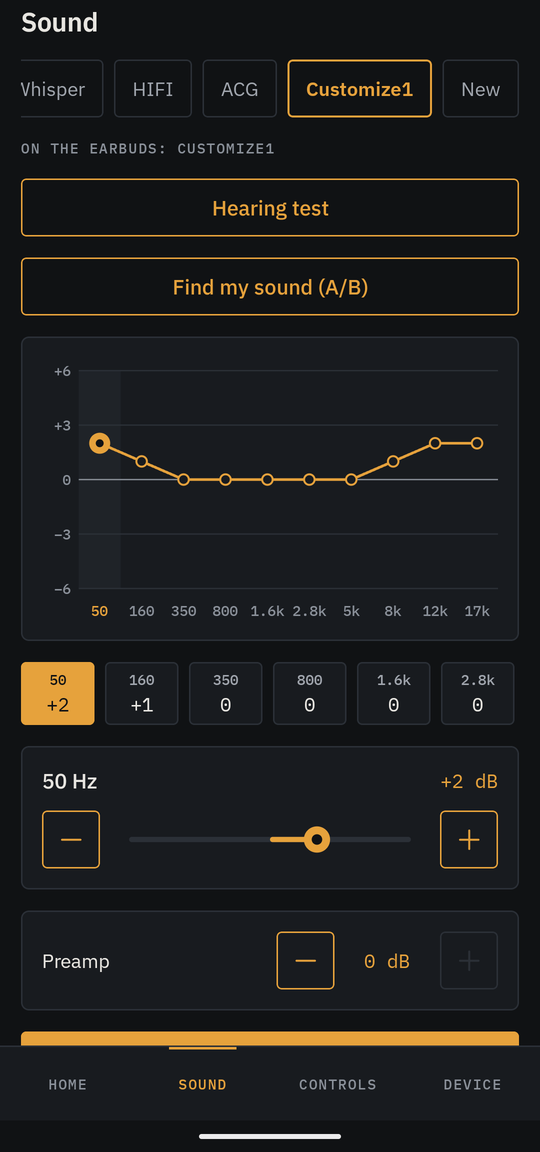
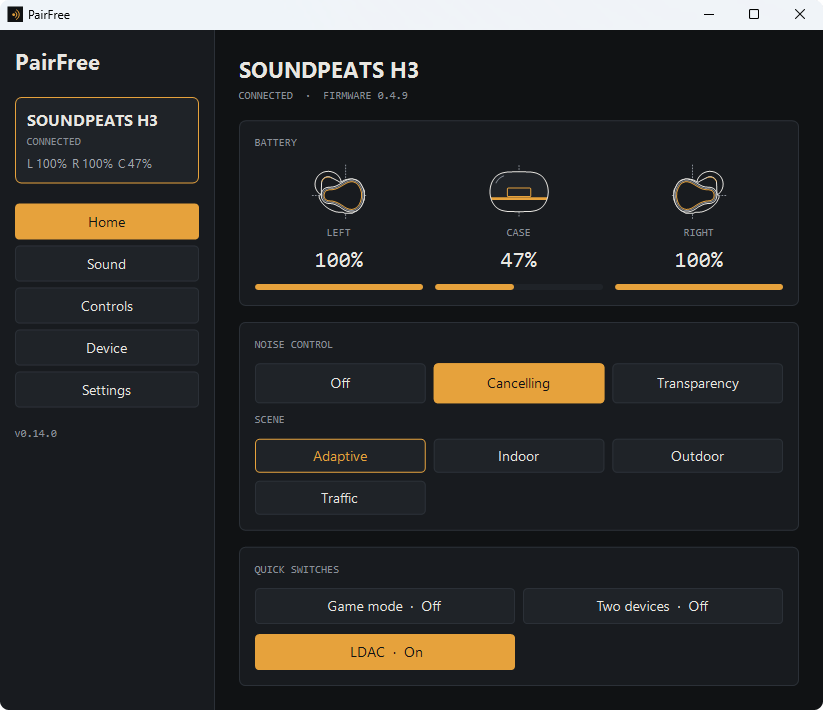
SOUNDPEATS models
PairFree knows 88 SOUNDPEATS models. Models that have been tried on real earbuds: Air5 Pro+, C30, H3, T3 Pro, TRUEFREE Clip C10.
SOUNDPEATS earbuds are the project’s origin: the owner’s H3 and Air5 Pro+ are tested in every feature, and users’ reports cover the C30 and the TRUEFREE Clip C10.
If your model is not marked as tried, a device report from you adds it: see how to help.
What works on each SOUNDPEATS model
| Model | Firmware code | Chip | Battery | Noise control | Transparency levels | Game mode | Two devices | LDAC | LE Audio | Gestures | Touch off | In-ear detection | Voice prompts | Auto power-off | Find earbuds | Water drain | Fit test | Equalizer |
|---|---|---|---|---|---|---|---|---|---|---|---|---|---|---|---|---|---|---|
| A8, ECHO | ECHO7018 | Jieli | Needs a device report | Needs a recording | ||||||||||||||
| Air3 Deluxe HS | AIR3DELUXEHSW53D | WUQI | Needs a device report | ✅ | ||||||||||||||
| Air3 Deluxe HS | BS519W2D | WUQI | Needs a device report | ✅ | ||||||||||||||
| Air3 Pro, Air3Pro | Air3Pro | Qualcomm | Needs a device report | ✅ | ||||||||||||||
| Air3, Air3-Deluxe | BS390RB | Qualcomm | Needs a device report | ✅ | ||||||||||||||
| Air4 | AIR4-BS590R2E | Qualcomm | Needs a device report | ✅ | ||||||||||||||
| Air4 Lite | WUQIAIRLITE | WUQI | Needs a device report | ✅ | ||||||||||||||
| Air4 Pro | AIR4PRO-BS588R2E | Qualcomm | Needs a device report | ✅ | ||||||||||||||
| Air5 | QCC3091AIR5 | Qualcomm | Needs a device report | ✅ | ||||||||||||||
| Air5 Lite | ZKLXAIR5LITE | Bluetrum | Needs a device report | ✅ | ||||||||||||||
| Air5 Pro | S1 | Qualcomm | Needs a device report | ✅ | ||||||||||||||
| Air5 Pro+ | S2 | Qualcomm | ✅ | ✅ | ✅ | ✅ | ✅ | ✅ | ✅ | ✅ | ✅ | — | ✅ | — | ✅ | ✅ | ✅ | ✅ |
| Air6 HS | S14 | Bluetrum | Needs a device report | ✅ | ||||||||||||||
| Air6 Lite | S36 | Bluetrum | Needs a device report | ✅ | ||||||||||||||
| Air6 Pro | S27 | Qualcomm | Needs a device report | ✅ | ||||||||||||||
| Air6 Pro | S32 | Qualcomm | Needs a device report | Needs a recording | ||||||||||||||
| AirClip | S11 | Bluetrum | Needs a device report | ✅ | ||||||||||||||
| Arc | S9 | Bluetrum | Needs a device report | ✅ | ||||||||||||||
| Aura Nebula | S30 | Qualcomm | Needs a device report | ✅ | ||||||||||||||
| Breezy | ZKLXBREEZY | Bluetrum | Needs a device report | ✅ | ||||||||||||||
| C30 | S15 | Bluetrum | Needs a device report | ✅ | ||||||||||||||
| C30 | S22 | Bluetrum | ✅ | ✅ | — | ✅ | ✅ | ✅ | — | ✅ | ✅ | — | ✅ | — | ✅ | ✅ | — | ✅ |
| Capsule3 Pro | QCYTS04 | QCY | Needs a device report | ✅ | ||||||||||||||
| Capsule3 Pro | SPTS04 | QCY | Needs a device report | ✅ | ||||||||||||||
| Capsule3 Pro+ | SPTS04PRO | QCY | Needs a device report | ✅ | ||||||||||||||
| CC3 Pro | S25 | Bluetrum | Needs a device report | ✅ | ||||||||||||||
| Chasers | ZKLXCHASERS | Bluetrum | Needs a device report | ✅ | ||||||||||||||
| ChatFree | JLChatFree | Jieli | Needs a device report | ✅ | ||||||||||||||
| Clear | JL6973Clear | Jieli | Needs a device report | ✅ | ||||||||||||||
| Clear Dot | JEILIClearDot | Jieli | Needs a device report | ✅ | ||||||||||||||
| Clear-Pods | JL6973D8ClearPods | Jieli | Needs a device report | ✅ | ||||||||||||||
| Clip1 | S7 | BES | Needs a device report | ✅ | ||||||||||||||
| Cove Pro | S21 | Jieli | Needs a device report | ✅ | ||||||||||||||
| CyberGear | ATS3019DK12 | Actions | Needs a device report | ✅ | ||||||||||||||
| Engine 4 | WuQiEngine4 | WUQI | Needs a device report | ✅ | ||||||||||||||
| Force Pro | QCC3046FORCEPRO | Qualcomm | Needs a device report | ✅ | ||||||||||||||
| GoFree | 3007AGOFREE | WUQI | Needs a device report | ✅ | ||||||||||||||
| GoFree | 7034MXGOFREE | WUQI | Needs a device report | ✅ | ||||||||||||||
| GoFree 2 | 7034MXGoFree2S | WUQI | Needs a device report | ✅ | ||||||||||||||
| GoFree 2 | NEW-WQ7034MXGoFree2 | WUQI | Needs a device report | ✅ | ||||||||||||||
| GoFree 2 | WQ7034MXGoFree2 | WUQI | Needs a device report | ✅ | ||||||||||||||
| GoFree 2+ | WUQIGoFree2J | WUQI | Needs a device report | ✅ | ||||||||||||||
| H1 | BT5107 | Qualcomm | Needs a device report | ✅ | ||||||||||||||
| H3 | S5 | Qualcomm | ✅ | ✅ | ✅ | ✅ | ✅ | ✅ | — | ✅ | ✅ | — | ✅ | — | ✅ | — | ✅ | ✅ |
| HearFit | JULIATS3025HearFit | Actions | Needs a device report | ✅ | ||||||||||||||
| Hi Listening | HILISTENING | Qualcomm | Needs a device report | Needs a recording | ||||||||||||||
| Life | T57 | Smartlink | Needs a device report | ✅ | ||||||||||||||
| Life3 | JIELILIFE3 | Jieli | Needs a device report | Needs a recording | ||||||||||||||
| LinkFree | JLLinkFree | Jieli | Needs a device report | ✅ | ||||||||||||||
| Mini HS | WUQIMINIHS | WUQI | Needs a device report | ✅ | ||||||||||||||
| Mini Pro | QCC3040 | Qualcomm | Needs a device report | ✅ | ||||||||||||||
| Mini Pro HS | WQT7033 | WUQI | Needs a device report | ✅ | ||||||||||||||
| Opera03 | OPERA03 | WUQI | Needs a device report | ✅ | ||||||||||||||
| Opera05 | OPERA05 | WUQI | Needs a device report | ✅ | ||||||||||||||
| PearlClip | BT893X | Bluetrum | Needs a device report | ✅ | ||||||||||||||
| PearlClip Pro | BT893XPro | Bluetrum | Needs a device report | ✅ | ||||||||||||||
| PearlClip Pro | S13 | Bluetrum | Needs a device report | ✅ | ||||||||||||||
| POP Clip | S24 | Bluetrum | Needs a device report | ✅ | ||||||||||||||
| POP Clip | S6 | Bluetrum | Needs a device report | ✅ | ||||||||||||||
| POP Clip2 | S19 | Bluetrum | Needs a device report | ✅ | ||||||||||||||
| POP Clip2 | S33 | Bluetrum | Needs a device report | ✅ | ||||||||||||||
| Q3 Pro | S12 | Bluetrum | Needs a device report | ✅ | ||||||||||||||
| Q30 HD+ | QCC3040Q30HD | Qualcomm | Needs a device report | ✅ | ||||||||||||||
| Q30 HD+ | QCC3046Q30HD | Qualcomm | Needs a device report | ✅ | ||||||||||||||
| Q35 HD+ | Q35HD | Qualcomm | Needs a device report | ✅ | ||||||||||||||
| Q40 HD | S23 | WUQI | Needs a device report | ✅ | ||||||||||||||
| Q40 HD | S8 | WUQI | Needs a device report | ✅ | ||||||||||||||
| RunFree | JULIRUNFREE | Actions | Needs a device report | ✅ | ||||||||||||||
| RunFree HS | RUNFREEHS | WUQI | Needs a device report | Needs a recording | ||||||||||||||
| RunFree Lite | FREELITE | WUQI | Needs a device report | ✅ | ||||||||||||||
| RunFree Lite2 | JULI3025Lite2 | Actions | Needs a device report | Needs a recording | ||||||||||||||
| RunFree Lite2 | WUQIRFLite2 | WUQI | Needs a device report | ✅ | ||||||||||||||
| Sonic | T28 | Qualcomm | Needs a device report | Needs a recording | ||||||||||||||
| Sonic Pro | T28Pro | Qualcomm | Needs a device report | Needs a recording | ||||||||||||||
| Sonic Pro | T28_Pro | Qualcomm | Needs a device report | ✅ | ||||||||||||||
| SOUNDOEATS Q35 HD+ | QCC3046Q35HD | Qualcomm | Needs a device report | ✅ | ||||||||||||||
| SOUNDPEAT GoFree 2s | S29 | Bluetrum | Needs a device report | ✅ | ||||||||||||||
| Space | R1292A7018F | Jieli | Needs a device report | ✅ | ||||||||||||||
| Space Lite | JLSPACELITE | Jieli | Needs a device report | ✅ | ||||||||||||||
| Space Pro | ZKLXSPACEPRO | Bluetrum | Needs a device report | ✅ | ||||||||||||||
| T3 Pro | S28 | Bluetrum | Needs a device report | ✅ | ||||||||||||||
| T3 Pro | ZKLXT3PRO | Bluetrum | ✅ | ✅ | — | ✅ | ✅ | — | — | ✅ | ✅ | — | ✅ | — | — | — | — | ✅ |
| TrueAir2 | BS343RB | Qualcomm | Needs a device report | ✅ | ||||||||||||||
| TRUEFREE C1, TRUEFREE soft | JL6973D8C1 | Jieli | Needs a device report | Needs a recording | ||||||||||||||
| TRUEFREE Clip C10 | T2 | UNKNOWN | ✅ | — | — | ✅ | ✅ | — | — | ✅ | ✅ | — | ✅ | — | ✅ | ✅ | — | ✅ |
| TRUEFREE F2 | WuQi7034MXF2 | WUQI | Needs a device report | Needs a recording | ||||||||||||||
| Truengine 3 SE, Truengine 3SE | BT5106-3040 | Qualcomm | Needs a device report | ✅ | ||||||||||||||
| Wings2 | TS03WINGS2 | Jieli | Needs a device report | ✅ | ||||||||||||||
The same list is on GitHub.
Why use PairFree
- No account and no internet. The app has no internet permission, so it cannot go online.
- One app for several brands. The same screens for every brand, instead of one app per pair of earbuds.
- Open source. GPL-3.0; the protocol is documented in the repository with tests, so anyone can check what the app sends to the earbuds.
- Small and quick: about 6 MB on Android and 16 MB on Windows, and reproducible: the published APK can be rebuilt from the source.
- On Windows as well as Android, where most of these brands have no app at all.
Get PairFree
On Android, PairFree is on F-Droid and on the GitHub releases page; it needs Android 12 or later. On Windows 10 or 11, download PairFree.exe from the same releases page and run it.
Other brands
PairFree controls earbuds of other brands too:
- Soundcore
- Bose
- JBL
- Sony
- Samsung Galaxy Buds
- AirPods and Beats
- Nothing and CMF
- Google Pixel Buds
- QCY
- 1MORE
- EarFun
- Cambridge Audio
- Sennheiser
- Jabra
- OnePlus and OPPO
PairFree is an independent project. It is not affiliated with or endorsed by SOUNDPEATS, Anker, Samsung, Sony, Bose, Harman (JBL), Apple, Nothing, Google, QCY, 1MORE, EarFun, Cambridge Audio, Sennheiser, Jabra, OnePlus or OPPO; the names are used to say which earbuds it works with.